

If there is one smartphone maker that refuses to let its flagship camera hardware sit idle after launch, it is vivo. While plenty of Android brands push out routine monthly security patches and call it a day, vivo continues to treat post-launch software support like an ongoing camera workshop.
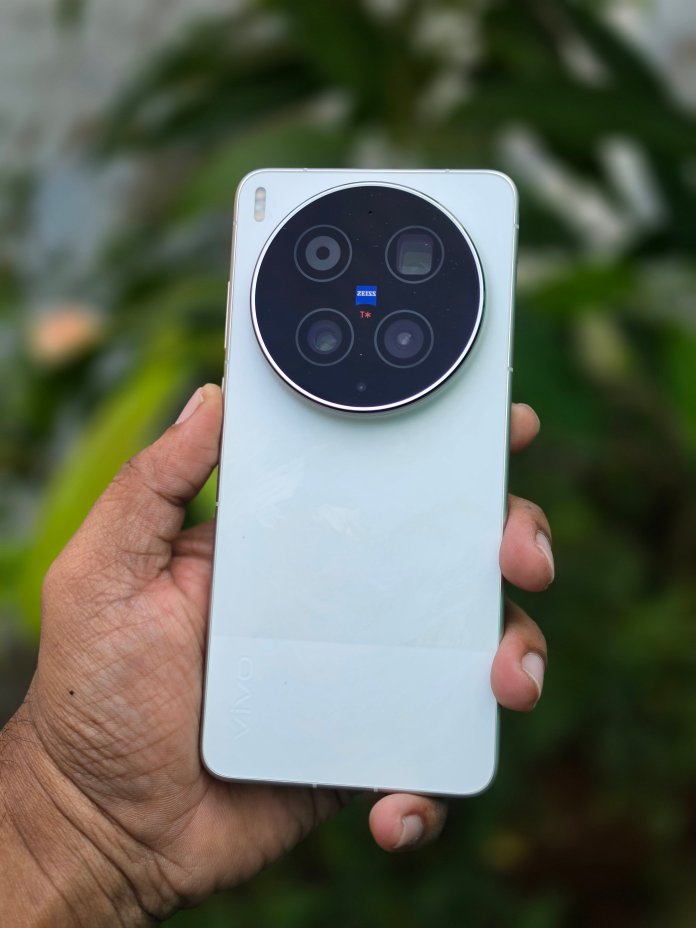
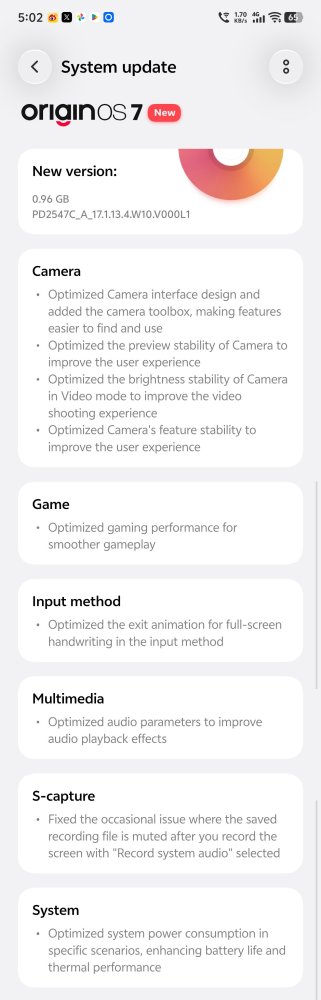
Today, the Chinese variant of the vivo X300 Ultra is receiving yet another substantial over-the-air (OTA) package—marking its 8th feature update since moving to OriginOS 7. Weighing in at 0.96GB and carrying firmware build number PD2547C_A_17.1.13.4.W10.V000L1, this release zeroes in on what X300 Ultra owners care about most: camera usability, video recording stability, gaming endurance, and thermal efficiency.
For mobile photography enthusiasts—and honestly, for rivals like Samsung watching from the sidelines—this kind of relentless post-launch tuning shows what happens when hardware ambition meets active software refinement.
Why This 8th OriginOS 7 Feature Update Matters
When the vivo X300 Ultra first received its initial OriginOS 7 stable update, the spotlight was on system-wide visual polish, Origin Workbench multitasking, and Android 17 foundations. Since then, vivo has followed a steady cadence—rolling out rapid stability builds like the 175MB OriginOS 7 maintenance patch and the 815MB second OriginOS 7 feature update—to fine-tune daily performance.
Now, with build PD2547C_A_17.1.13.4.W10.V000L1, vivo is circling back to its crown jewel. Instead of scattering minor tweaks across random system menus, nearly half of this 0.96GB changelog targets the camera app directly.
A Redesigned Camera Interface and New Camera Toolbox
Anyone who shoots heavily on a flagship phone knows that great sensors only go so far if the viewfinder gets in your way. With this update, vivo introduces a redesigned Camera interface paired with a brand-new Camera Toolbox.
The goal here is speed and ergonomics. Whether you are switching focal lengths on the fly, adjusting exposure parameters, or toggling pro-level shooting aids, having a cleaner layout and an accessible toolbox keeps essential controls within thumb’s reach without cluttering your framing. It builds neatly on vivo’s broader imaging push outlined in the OriginOS 7 October to December feature rollout roadmap, which also brought fresh Camera Color Styles and gallery editing upgrades to the X300 lineup.
Smoother Viewfinder Preview and Video Brightness Stability
Beyond visual layout changes, vivo has addressed three underlying imaging pain points that experienced mobile shooters will immediately appreciate:
Improved camera preview stability: Framing complex scenes, fast-moving subjects, or switching between lenses now feels noticeably steadier in the live viewfinder, eliminating micro-stutters before you even press the shutter.
Better brightness stability while recording videos: One of the biggest giveaways of smartphone video is sudden exposure hunting when panning between bright skies and shaded streets. This update smooths out luminance transitions mid-recording, giving video clips a far more natural, cinema-like consistency.
General camera feature stability improvements: Under-the-hood bug fixes ensure that specialty shooting modes and portrait algorithms behave reliably during back-to-back shooting sessions.
Gaming, Thermals, and Battery Life Get Attention Too
Even though the camera steals the headlines, vivo did not ignore everyday endurance. Heavy camera usage—especially 4K or high-bitrate video capture—puts serious strain on the chipset and battery.
Build PD2547C_A_17.1.13.4.W10.V000L1 bundles targeted thermal performance optimizations alongside better battery life tuning. In practical terms, your X300 Ultra should run cooler during extended outdoor photo walks and hold onto its charge longer during mixed daily use. Gamers also get a welcome boost with improved gaming performance, helping sustain smoother frame rates without premature thermal throttling.
Complete Changelog: vivo X300 Ultra (PD2547C_A_17.1.13.4.W10.V000L1)
Here is the full breakdown of what arrives in this 0.96GB OriginOS 7 update:
Camera
Redesigned Camera interface for cleaner navigation and faster control access
Added a new Camera Toolbox for quick access to key shooting tools
Improved camera preview stability across shooting modes
Better brightness stability while recording videos
Overall camera feature stability improvements
System & Performance
Improved gaming performance for smoother sustained gameplay
Better battery life and enhanced thermal performance under load
| Update Parameter | Details |
| Device | vivo X300 Ultra (China Variant) |
| Firmware Build | PD2547C_A_17.1.13.4.W10.V000L1 |
| Update Size | 0.96 GB |
| Software Version | OriginOS 7 (Android 17) |
| Release Milestone | 8th OriginOS 7 Feature Update |
Samsung, Take Notes: Why Post-Launch Momentum Matters
It is hard to look at vivo’s update cadence on the X300 Ultra without drawing comparisons to its biggest Android competitors. Samsung still sets the gold standard for multi-year OS longevity promises, yet Galaxy Ultra owners often wait months—or until the next major One UI point release—for meaningful camera UI overhauls or video exposure fixes.
vivo is taking the opposite approach. By shipping eight feature-rich OriginOS 7 updates in rapid succession—while simultaneously expanding OriginOS 7 global early access and rolling out the OriginOS 7 India schedule for eligible vivo devices—the company is proving that flagship ownership should keep getting better long after unboxing day.
How to Download and Install the Update
The 0.96GB OTA update is rolling out in phased batches to vivo X300 Ultra (China ROM) units. If you haven’t received the automatic notification yet, you can check manually:
Connect your vivo X300 Ultra to a reliable Wi-Fi network and ensure your battery is charged above 40%.
Open the Settings app and scroll down to System Update.
Tap Check for Updates to scan for build PD2547C_A_17.1.13.4.W10.V000L1.
Tap Download and Install, and allow your phone to reboot once the installation completes.
Have you installed this 0.96GB OriginOS 7 update on your vivo X300 Ultra yet? Let us know how the redesigned camera interface and new Camera Toolbox feel in daily shooting!


 gets its 8th OriginOS 7 feature update (build PD2547C_A_17.1.13.4.W10.V000L1, 0.96GB) featuring a redesigned camera UI, new Camera Toolbox, video brightness stability, and better battery life. %%sep%% Read in %%primary_category%% on %%sitename%%)