

Vivo has officially introduced OriginOS 7, bringing a comprehensive upgrade built around intelligent productivity, deeper cross-device integration, and personalized interface design. Based on Android 17, the new custom skin introduces significant UI enhancements alongside an upgraded suite of system-level AI tools.
For smartphone owners in India, Vivo has officially shared the complete multi-stage deployment plan starting later this month.
What’s New in OriginOS 7?
OriginOS 7 focuses on refining daily operations through visual polish, engine optimizations, and seamless connectivity tools across smartphones and connected PCs.
1. Refined Design & Dynamic Visuals
The interface receives a major aesthetic overhaul with translucent visual elements and custom depth capabilities across three distinct material styles: Real, Natural, and Soft.
Interactive Lock Screen Themes: New interactive options like Pet Pals, Wiggle, and Glint dynamically shift iridescence, pattern alignment, and lighting based on device movement or touch inputs.
StickIt Customization: Users can now pin interactive stickers and quick-access widgets directly onto both home and lock screens.
2. Smarter Interactions with Jovi AI
Vivo’s AI assistant, Jovi AI, receives expanded capabilities designed to reduce multi-step navigation.
Natural Text AI Search: Search across the device’s native File Manager and Origin Notes using contextual phrase descriptions rather than strict filenames.
Snap & Go Context Extraction: Capturing a screenshot of transit info, flight details, or calendar schedules automatically extracts relevant data and syncs it with Google Calendar via Origin Island.
Cross-Device Command Execution: Manage files, compile schedule summaries, or trigger tasks across connected PCs directly from your mobile device.
3. Productivity & Multi-Tasking Upgrades
To support power users, OriginOS 7 introduces expanded multi-window features through the Origin Workbench, allowing up to five applications to run simultaneously. The system also supports AI Cross-App Drag, letting users seamlessly move text, media, and images across open apps.
For cross-platform integration, the Office Kit includes Camera Sharing, Task Handoff, and lossless high-speed transfers via Shake & Share. Vivo users can also directly browse and access iCloud for Web through the system File Manager.
4. Core System Performance & Efficiency
Under the hood, system resource allocation and rendering engines have been re-engineered for long-term consistency, validated through a 72-month sustained anti-aging benchmark:
10% faster app cold startup speeds.
11% faster page transition switching.
14.4% boost in overall graphics rendering efficiency.
20% energy reduction during high-demand gaming via Heterogeneous Computing.
Up to 26% longer connected standby battery life.
For deeper context on preliminary feature teasers and launch dates leading up to the official unveiling, check out Nokia Power User’s coverage on the OriginOS 7 teaser and launch date reveal.
OriginOS 7 Rollout Timeline in India
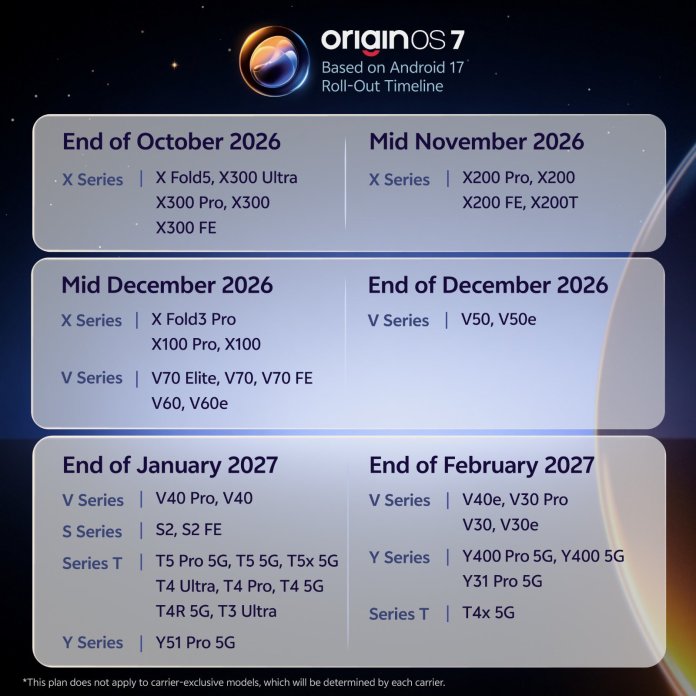
The update will roll out in phased batches starting late October 2026 and extending through early 2027. Newly announced devices—including the Vivo X Fold 6, Vivo V80, and Vivo S2 FE—come pre-installed with OriginOS 7 out of the box.
| Deployment Window | Eligible Vivo Models |
| End of October 2026 | Vivo X Fold 5, Vivo X300 Ultra, Vivo X300 Pro, Vivo X300, Vivo X300 FE |
| Mid-November 2026 | Vivo X200 Pro, Vivo X200, Vivo X200 FE, Vivo X200T |
| Mid-December 2026 | Vivo X Fold 3 Pro, Vivo X100 Pro, Vivo X100, Vivo V70 Elite, Vivo V70, Vivo V70 FE, Vivo V60, Vivo V60e |
| End of December 2026 | Vivo V50, Vivo V50e |
| End of January 2027 | Vivo V40 Pro, Vivo V40, Vivo S52, Vivo S52 FE, Vivo T5 Pro 5G, Vivo T5 5G, Vivo T5x 5G, Vivo T4 Ultra, Vivo T4 Pro, Vivo T4 5G, Vivo T4R 5G, Vivo T3 Ultra, Vivo Y51 Pro 5G |
| End of February 2027 | Vivo V40e, Vivo V30 Pro, Vivo V30, Vivo V30e, Vivo Y400 Pro 5G, Vivo Y400 5G, Vivo Y31 Pro 5G, Vivo T4x 5G |
To learn more about the broader global rollout strategy, global build features, and Android 17 integrations, explore Nokia Power User’s breakdown of the OriginOS 7 global Android 17 feature list as well as their analysis on the OriginOS 7 global launch, redesign, and beta testing phase.


