

vivo isn’t wasting any time when it comes to refining its flagship software experience. Following the recent OriginOS 7 teaser features and official launch date announcement, the company has already begun rolling out its second major post-launch software update for the vivo X300 Ultra (China edition).
Carrying build number PD2547C_A_17.1.9.5.W10.V000L1 and weighing in at a moderate 815 MB, this patch focuses heavily on system fluidity, thermal management, smart assistant responsiveness, and bug fixes across everyday productivity apps.
If you are running the Chinese variant of the vivo X300 Ultra, here is a detailed breakdown of everything included in this latest OTA package.
What’s New in Build PD2547C_A_17.1.9.5?
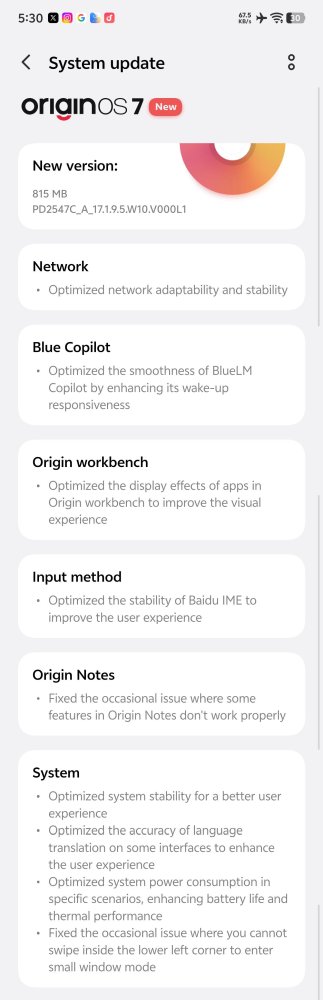
While minor patch updates often stick to security fixes, this 815 MB update delivers notable quality-of-life refinements across system navigation, battery efficiency, and local assistant features. This quick iteration cycle comes shortly after vivo showcased its new design direction during the recent developer conferences, where details emerged regarding the OriginOS 7 Liquid Glass UI alongside ColorOS 17.
┌─────────────────────────────────────────────────────────┐
│              OriginOS 7 Update Details                  │
├───────────────────┬─────────────────────────────────────┤
│ Target Device     │ vivo X300 Ultra (China Edition)     │
│ Software Version  │ PD2547C_A_17.1.9.5.W10.V000L1       │
│ Download Size     │ 815 MB                              │
│ Core Focus        │ Stability, Thermals & Bug Fixes    │
└───────────────────┴─────────────────────────────────────┘
Key Improvements & Feature Refinements
Better Network Adaptability & Signal Stability
Optimizations in radio band switching mean fewer dropped connections when transitioning between Wi-Fi and mobile networks or moving through low-reception areas.
Faster BlueLM Copilot Wake-Up Responsiveness
vivo’s onboard AI assistant, BlueLM Copilot, now responds noticeably faster to voice triggers and wake phrases, eliminating the slight delay present in early builds.
Origin Workbench Visual Upgrades
The UI layout for Origin Workbench receives refined typography, cleaner workspace borders, and improved blur effects, making multi-window task organization visually cleaner.
Enhanced Baidu IME Input Stability
Fixed sporadic lag spikes and app crash bugs reported when using the pre-installed Baidu IME keyboard across heavy social media or messaging platforms.
Origin Notes Fixes
Resolved functional bugs in Origin Notes, including occasional text formatting drops, cloud sync glitches, and widget rendering stalls.
System & Translation Improvements
UI Translation Accuracy: Fixed mislabeled option strings and incomplete text translations in secondary menu interfaces.
General Stability: Overall reduced frame drops during rapid multitasking.
Thermals, Power Consumption & Battery Optimization
Under-the-hood power delivery tweaks keep thermal output lower during sustained tasks (like gaming or camera recording), while slightly improving background idle battery drain.
Corner Gesture Bug Fix (Small Window Mode)
Fixed an annoying UI bug where triggering Small Window mode by dragging up from the lower-left corner would freeze or fail to pop up intermittently.
Summary of Official Changelog
System & Connectivity:
Improved network adaptability and signal stability.
Improved overall system stability and animation smoothness.
Fixed mislabelled translation strings across select UI menus.
AI & Input Tools:
Improved BlueLM Copilot wake-up responsiveness.
Enhanced Baidu IME keyboard stability.
Productivity & Multitasking:
Optimized Origin Workbench visual aesthetics.
Fixed functional issues within the Origin Notes app.
Fixed gestures for entering Small Window mode from the lower-left corner.
Power & Performance:
Optimized idle power consumption and overall battery endurance.
Reduced thermal build-up during heavy device usage.
How to Install the Update
Ensure your vivo X300 Ultra has at least 40% battery or is connected to a charger.
Connect to a stable Wi-Fi connection (the download size is 815 MB).
Go to Settings > System Update.
Tap Check for Updates.
Once
PD2547C_A_17.1.9.5.W10.V000L1appears, tap Download and Install.Allow the phone to restart naturally after installation completes.
Note for Global Users: This patch applies specifically to the China ROM running OriginOS 7. If you are waiting for news on global rollout schedules or testing programs outside China, check out our breakdown on the OriginOS 7 global launch features, redesign, and beta rollout.


 for the vivo X300 Ultra running OriginOS 7. Discover all performance, thermal, and feature refinements. %%sep%% Read in %%primary_category%% on %%sitename%%)