If you are running the One UI 9.0 beta or eagerly awaiting the stable update on your Samsung device, a massive optimization barrier just vanished. Samsung has officially updated its powerful, hidden system utility app—Good Guardians—alongside its standout module, Galaxy App Booster, to fully support One UI 9.0 (Android 17).
For anyone who notices micro-stutters, sudden battery drops, or slightly warmer thermals right after a major OS update, this is the fix you need. It is time to head to the Galaxy Store and hit update.
What are Good Guardians and Galaxy App Booster?
For the uninitiated, while Good Lock handles the aesthetic customization of your Galaxy device, Good Guardians is Samsung’s official suite for under-the-hood hardware and software health.
The crown jewel of this suite is Galaxy App Booster. Right after a major Android transition like One UI 9.0, your system compiles apps on the fly, which can cause background lag and battery drain. Galaxy App Booster forces a pre-compilation of all your installed applications into efficient machine code, often improving app launch speeds and system stability by 15% to 140%.
What’s New in the One UI 9.0 Update?
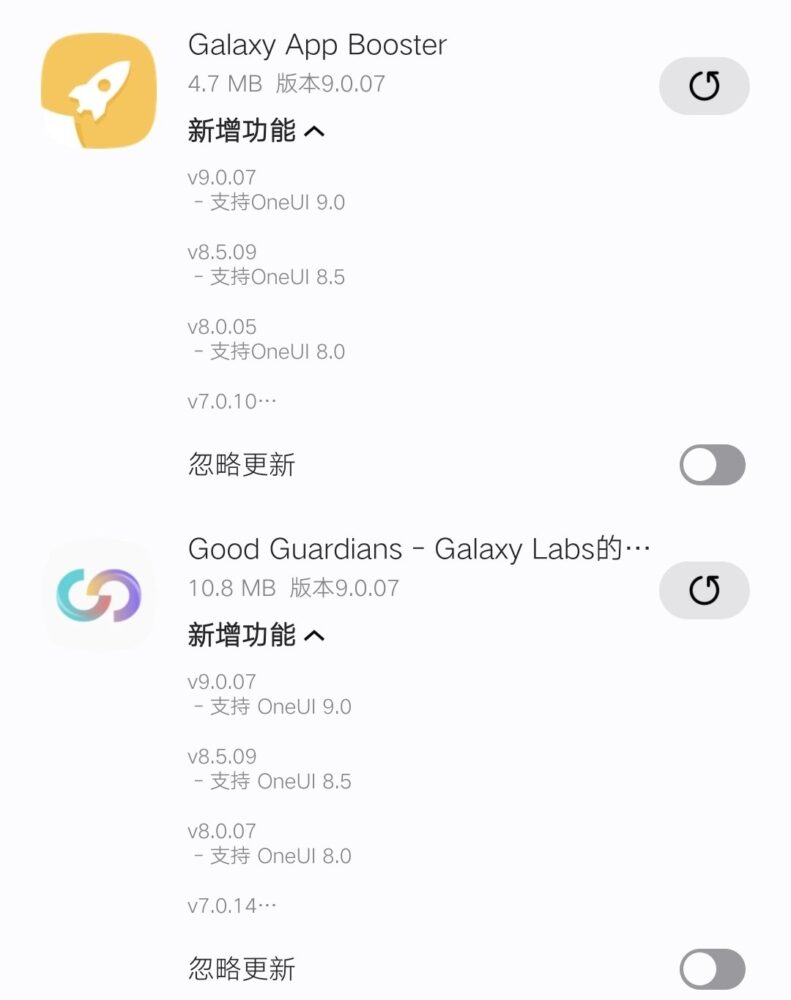
The new version 9.0.07 update rolls out system-wide compatibility so these heavy-duty optimization tools don’t crash on Android 17. Samsung is actively updating its first-party ecosystem ahead of its major stable rollouts later this season.
Alongside the core app, key modules have received the native One UI 9.0 treatment:
Galaxy App Booster: Smooths out app performance and stops post-update lag.
Thermal Guardian: Gives granular control over CPU throttling thresholds on the new OS.
Battery Guardian: Features minor tweaks, including a network power-saving tool to restrict battery-heavy 5G usage when data demands are low.
If you like staying on top of tech updates, check out more Android coverage on NokiaPowerUser.
How to Update Right Now
Because Good Guardians is region-locked in certain markets, the safest way to pull the update is through Samsung’s official marketplace.
1.Open Galaxy Store:Step 1.
Pro-Tip: Always run Galaxy App Booster immediately after installing any system security patch or OS upgrade. It drastically cuts down on background battery drain during the initial days of a new update.
Have you noticed a performance bump on One UI 9.0 after running the booster? Let us know in the comments below!
Interested in reading more about latest news, leaks and reviews of Samsung smartphones. Read our full Samsung coverage by clicking here.
Please follow us on our Facebook page and X account for all latest and breaking Google, Android and Nokia related news.