

Hot on the heels of the stable QPR2 rollout, Google is keeping the momentum going for beta testers. Android 17 QPR3 Beta 4 is officially rolling out over-the-air (OTA) to eligible Google Pixel smartphones, tablets, and foldables.
Carrying build number DP11.261030.003, this latest pre-release build isn’t loaded with flashy visual overhauls. Instead, it focuses squarely on what beta testers actually care about at this stage of the cycle: squashing frustrating performance bottlenecks, stopping runaway battery drain, and restoring a missing audio control. If your daily driver has been acting sluggish or dying early on previous QPR3 builds, this update is aimed directly at you.
What’s New and Fixed in Android 17 QPR3 Beta 4?
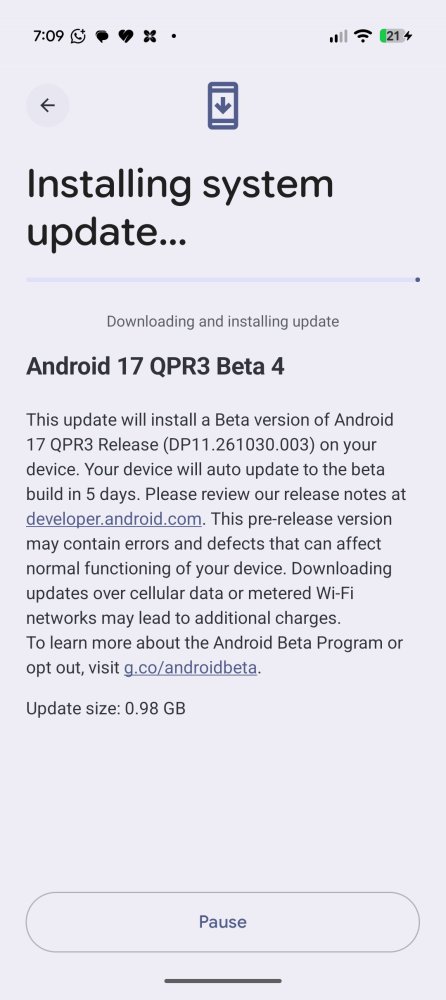
According to Google’s official release notes, QPR3 Beta 4 targets four major under-the-hood bugs that were dragging down system stability and usability, alongside a welcome surprise for audio enthusiasts.
1. Memory Leaks and Launcher Crashes Resolved
The headline fix in Beta 4 tackles severe memory leaks inside system_server. On earlier builds, high memory consumption caused noticeable UI stutter, sudden Pixel Launcher crashes, and random device reboots. Google has patched multiple tracked issues tied to this leak, which should make multitasking and switching between apps feel noticeably snappier again.
2. Bluetooth Background Battery Drain Patched
If you rely on a smartwatch, fitness tracker, or wireless earbuds throughout the day, you likely noticed your Pixel losing charge far faster than usual. Excessive background Bluetooth activity was consuming abnormal amounts of power. Beta 4 resolves this runaway process, bringing standby and connected battery endurance back to normal levels.
3. On-Screen Keyboard Clipping Fixed
Typing on a half-cut keyboard is nobody’s idea of fun. Google has fixed a visual rendering bug where the on-screen keyboard appeared clipped or partially cut off during text input across certain apps.
4. Cleaner Conscrypt TLS Error Handling
For developers and power users, Google updated Conscrypt so that it no longer throws an unclear IllegalArgumentException when rejecting outdated TLSv1 or TLSv1.1 connections in apps targeting API level 36 or higher.
Bonus Change: Bluetooth Absolute Volume Returns
Beyond the official changelog, early testers have spotted that Android 17 QPR3 Beta 4 brings back the missing Bluetooth absolute volume toggle in Developer Options. This gives users granular control over how their phone syncs volume levels with external Bluetooth speakers and headphones.
Eligible Pixel Devices for Android 17 QPR3 Beta 4
Google is pushing this update across a wide lineup of 23 Pixel devices enrolled in the Android Beta Program. While the original Pixel 6 and Pixel 6 Pro wrapped up their official update cycle earlier this year, the Pixel 6a and everything newer remains supported:
| Device Category | Supported Pixel Models |
| Pixel 6 & 7 Series | Pixel 6a, Pixel 7, Pixel 7 Pro, Pixel 7a |
| Pixel 8 Series | Pixel 8, Pixel 8 Pro, Pixel 8a |
| Pixel 9 Series | Pixel 9, Pixel 9 Pro, Pixel 9 Pro XL, Pixel 9 Pro Fold, Pixel 9a |
| Pixel 10 Series | Pixel 10, Pixel 10 Pro, Pixel 10 Pro XL, Pixel 10 Pro Fold, Pixel 10a |
| Pixel 11 Series | Pixel 11, Pixel 11 Pro, Pixel 11 Pro XL, Pixel 11 Pro Fold |
| Foldables & Tablets | Pixel Fold (1st Gen), Pixel Tablet |
How Contextually Does This Fit Into Google’s Update Roadmap?
Google has been moving at a breakneck pace with its software schedule throughout 2026. Just days ago, the company pushed out the stable public build of QPR2—which you can read all about in our Android 17 QPR2 complete feature breakdown—alongside a massive seasonal feature rollout detailed in our coverage of the November Pixel Drop with Gemini Intelligence and Pixel Tag.
While stable users are enjoying those fresh features right now, QPR3 is laying the groundwork for Google’s early 2027 platform drop. If you have been tracking how the OS has evolved since its initial debut—from the early changes we highlighted in our Android 17 Beta features and first impressions to the broader Android 17 eligible devices list across major brands—you will notice a clear pattern. Google is prioritizing under-the-hood efficiency, battery longevity, and tighter memory limits over flashy UI gimmicks. Even earlier builds like Android 17 QPR2 Beta 7 focused heavily on squashing idle battery drain before moving to stable.
How to Install Android 17 QPR3 Beta 4 on Your Pixel
If your Pixel is already enrolled in the Android Beta Program, you don’t need to do anything special to grab the update:
Open the Settings app on your Pixel device.
Scroll down and tap System > System update.
Tap Check for update to pull build DP11.261030.003.
Download and restart your phone once the installation finishes.
Not enrolled yet? You can opt in via the official Google Android Beta Program portal. Keep in mind that if you decide to leave the beta track later before QPR3 reaches stable status, reverting to a public build will wipe your device’s local data—so always back up your photos and files beforehand.
Have you installed Android 17 QPR3 Beta 4 on your Pixel yet? Notice any improvement in battery life or system smoothness, or have you spotted any new quirks? Let us know which Pixel model you’re running in the comments below!


 to eligible Pixel phones. Check out the critical memory leak fixes, Bluetooth battery drain patch, and installation guide. %%sep%% Read in %%primary_category%% on %%sitename%%)