vivo has consistently pushed mobile imaging boundaries, marrying high-end optical hardware with sophisticated software tuning. With the rollout of OriginOS 7, the brand is once again shifting focus to the viewfinder, rolling out a massive suite of camera-centric enhancements alongside a complete architectural overhaul of the operating system. From deep ZEISS integrations to structural UI overhauls and performance tweaks, this update aims to refine how creators capture everyday moments.
For a comprehensive overview of how these foundational software changes tie into the broader ecosystem, you can check out the details on OriginOS 7 Official Features: Liquid Motion, Blue River Engine. Let’s dive deep into what the OriginOS 7 camera update brings to the table and whether it lives up to the hype.
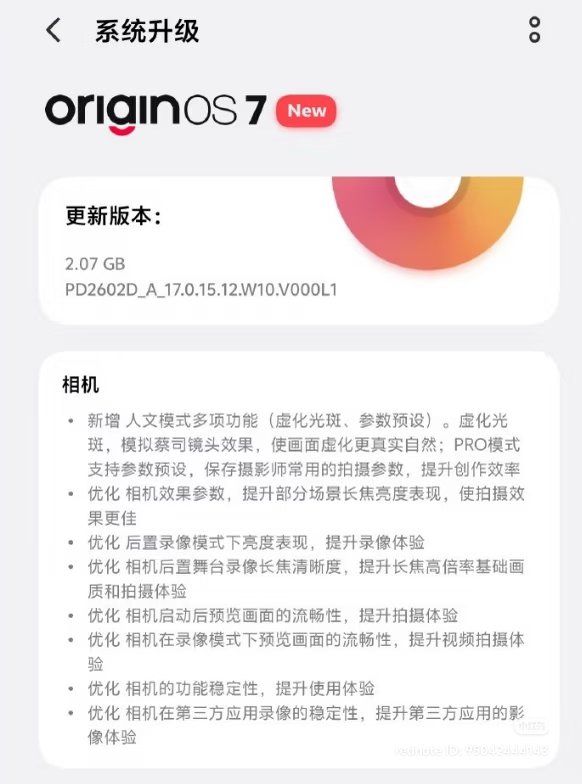
What’s New in the OriginOS 7 Camera Package?
The latest software deployment is far more than a minor patch. It brings a targeted array of upgrades designed to polish both the shooting experience and final output:
New Portrait Mode with ZEISS Bokeh: Building on vivo’s legendary partnership with ZEISS, the update introduces refined optical blur profiles, mimicking iconic vintage lenses with cleaner subject-background separation and more organic light falloff.
Custom Portrait Presets: Users can now build, save, and fine-tune their own signature portrait looks, adjusting skin tones, contrast, and grading to create repeatable styles on the fly.
Improved Telephoto Performance: Telephoto optimization yields sharper long-range shots, reducing noise and enhancing detail retention across mid-to-high zoom ranges.
Better Video Recording: Stability and dynamic range receive a welcome boost, resulting in cleaner low-light footage and smoother transitions when shifting focal lengths during recording.
Smoother Camera Previews: Elimination of viewfinder stutter ensures that what you see on the screen matches the final processed shot with near-zero latency.
Enhanced Stability Across Native and Third-Party Apps: Whether you are shooting natively or capturing content directly inside social platforms, overall app stability and processing hand-offs have been heavily streamlined.
System-Level Synergies: Aesthetics and Performance
A great camera experience requires more than just good glass and a standalone app; it relies heavily on system fluidity and responsive rendering. OriginOS 7 introduces fresh visual dimensions, including advanced light and shadow dynamics. To explore how these texture modes and visual engines operate across the UI, take a look at the OriginOS 7 Light & Shadow Aesthetics Guide.
Furthermore, system apps and gallery layouts have been completely redesigned for intuitive one-handed operation. You can inspect the structural changes firsthand via the OriginOS 7 System App Interface First Look. These design principles ensure that reviewing, editing, and sharing your high-resolution photos happens instantly without interface lag.
Rollout Timeline and Device Availability
vivo is structuring the deployment of these features thoughtfully alongside its Android-based rollout schedule. Flagship X-series devices lead the deployment waves, followed by high-end foldables and performance models. To see when your specific handset is scheduled to receive the upgrade package, review the OriginOS 7 India Rollout Timeline & Features.
Alongside core camera optimizations, the update introduces fresh color profiles—including Chasing Light, Rich, Cool White, and humanistic styles like Street, Portrait, and Life—ensuring users have access to versatile grading options right out of the box.
Final Thoughts: Is It Worth the Wait?
If you rely on your smartphone as your primary daily camera, OriginOS 7 delivers the operational fluidity and stylistic depth that mobile creators crave. While it won’t magically swap out your physical hardware, it extracts significantly more capability out of vivo’s existing sensors.
Between the refined ZEISS bokeh, advanced engine optimizations, and streamlined third-party app integration, this update successfully bridges the gap between raw hardware potential and effortless software execution.