

OriginOS 7 introduces a refreshed design philosophy centered around ambient awareness and personal choice. By combining advanced real-time optical physics with explicit controls over UI texture, Vivo’s latest software layer bridges the gap between static smartphone screens and physical lighting environments.
Understanding the New Visual Engine


At the core of OriginOS 7 is a completely rebuilt visual effects engine, optimized with low-overhead rendering algorithms to prevent GPU throttling during heavy animations. Rather than relying on simple opacity overlays, the interface computes how ambient light interacts with surface elements in real time.
Light and Shadow Aesthetics: Dynamic shadow angles and micro-highlights adapt smoothly across widgets, panels, and system icons to mirror real-world light sources.
Optical Refraction Sensing: By polling real-time ambient light data from onboard environmental sensors, the UI subtly shifts its refraction angles as you transition between bright indoor lighting, direct sunlight, or dark rooms.
Pixel-Level Translucency: Frosted glass panels, notification shades, and task switches utilize multi-pass blur pipelines, ensuring underlying wallpaper colors bleed through without compromising foreground contrast or text sharpness.
Efficient Rendering Algorithms: The upgraded pipeline minimizes frame drops during rapid multitasking while retaining high-fidelity visual effects across various battery profiles.
To stay up to date on broader industry launches, mobile software trends, and device availability news, read the latest coverage over at NokiaPowerUser.
Personalized Display Modes: Realistic, Natural, and Soft
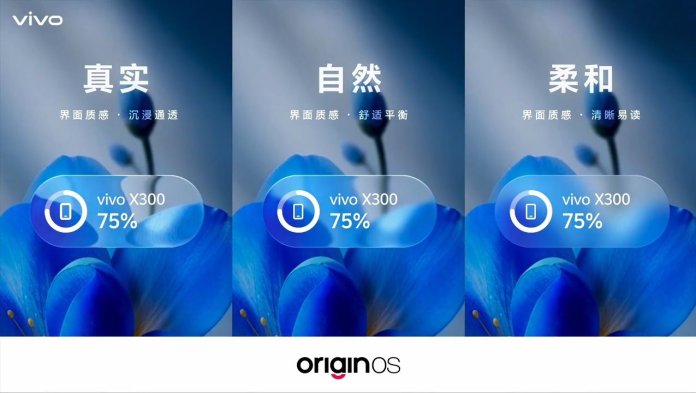
Recognizing that visual preferences vary significantly depending on lighting condition and screen usage, OriginOS 7 allows users to manually switch interface designs across three distinct texture modes.
Practical Everyday Benefits
Beyond visual appeal, these architectural changes directly impact day-to-day usability.
Enhanced Daylight Readability
The optical refraction sensing system monitors ambient lighting intensity, automatically boosting contrast and dampening secondary translucency effects when you are outdoors under direct sun.
Consistent Performance Under Load
The new rendering pipeline prioritizes background thread efficiency. UI elements, notification drawers, and blur effects render consistently at peak refresh rates without causing system heat spikes or aggressive background app closures.
Customizable Eye Comfort
By switching manually between Realistic, Natural, and Soft display textures, users can easily dial back aggressive glass-morphism effects during late-night hours without altering their primary color theme or font settings.





 to elevate Vivo's mobile experience. %%sep%% Read in %%primary_category%% on %%sitename%%)