

If you are carrying a eligible Vivo or iQOO device, keep an eye on your system update tab. A fresh wave of the Android 17-based OriginOS 7 build is officially rolling out to users globally and across major markets like India.
Weighing in at a moderate 1.25GB, this iteration builds upon Vivo’s latest software layer, refining performance, bolstering background efficiency, and fixing key UI bugs. Whether you have been following the initial unveiling of Vivo’s custom software or waiting for your specific batch to drop, this update delivers quality-of-life changes designed to make daily interactions feel sharper.
Here is a detailed breakdown of what is inside the latest 1.25GB payload, how it improves day-to-day usability, and where you can check device eligibility.
What’s New in the Latest OriginOS 7 Build?
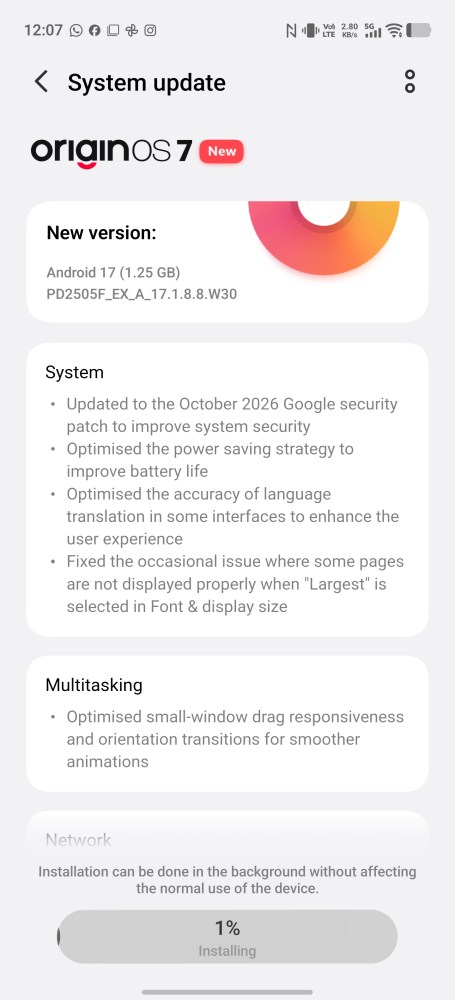
While earlier releases introduced broad structural shifts—such as the dynamic translucent design language, AI-driven task management, and new lock screen customizations—this targeted update zeroes in on system stability, battery optimization, and accessibility.
┌────────────────────────────────────────────────────────┐
│               ORIGINOS 7 UPDATE SUMMARY                │
├────────────────────────────────────────────────────────┤
│ Build Platform : Android 17                            │
│ Download Size  : ~1.25 GB                              │
│ Security Level : October 2026 Patch Level              │
│ Focus Areas    : Power Efficiency, Animation Smoothness│
└────────────────────────────────────────────────────────┘
1. October 2026 Google Security Patch
Security updates are the backbone of any healthy operating system. By integrating the latest October 2026 Google Security Patch, this build patches critical vulnerabilities in core Android frameworks, device driver layers, and network stacks. It ensures your phone remains protected against modern zero-day exploits while keeping device data encrypted and secure.
2. Optimised Power-Saving Strategy for Extended Battery Life
Battery longevity continues to be a primary area of focus for mobile software engineering. The revised power-saving algorithm in this update changes how the OS schedules background processes during idle states.
Rather than relying on aggressive background app termination—which often delays push notifications or requires high-energy app cold restarts—OriginOS 7 dynamically allocates CPU and GPU core frequencies based on real-time usage patterns. The result is a noticeable decrease in background battery drain during standby hours, allowing flagships and mid-range devices to stretch their battery endurance further on a single charge.
3. Improved System Language Translation
For multi-lingual users and non-English regional interfaces, translation inconsistencies can disrupt navigation. This update includes updated language packs and context-aware system text engine adjustments. Labels within complex settings sub-menus, native apps (like File Manager, Origin Notes, and Jovi Assistant), and system notifications are now translated far more accurately, eliminating awkward line wraps or broken phrases.
4. Resolved Display Issues with Large Font Sizes
Accessibility fixes form a critical part of this rollout. Previously, users who set their display fonts to the largest available size experienced layout overlapping, clipped text blocks, or misaligned interface cards in specific stock applications.
This update revises the dynamic text-scaling logic across system apps. Content containers now scale fluidly alongside increased font dimensions, preventing awkward text wrapping and maintaining visual consistency across the entire UI.
5. Smoother Small-Window Animations & Transitions
Multitasking on mobile screens demands seamless transition effects. OriginOS 7’s floating small-window feature allows users to run secondary applications over active apps.
This build optimizes the visual rendering pipeline specifically for window resizing, dragging, and minimizing. By reducing frame drops during gesture-based transitions, switching between mini-windows and full-screen views feels significantly smoother, eliminating micro-stutters when launching floating chats or video overlays.
Deep Dive: How OriginOS 7 Enhances the Android 17 Experience
The foundation of OriginOS 7 centers on marrying Android 17’s core architectural advantages with custom visual aesthetics.
For comprehensive coverage on how Vivo designed its latest OS, check out NPowerUser’s in-depth OriginOS 7 launch and features breakdown. They cover the full spectrum of feature sets, ranging from natural language AI search across system notes to cross-device Office Kit handoffs.
Furthermore, if you want to understand the design decisions behind the updated interface aesthetics, explore NPowerUser’s OriginOS 7 Light & Shadow Aesthetics guide. The article highlights how Vivo uses real-time lighting physics to dynamically adjust window transparency, background blurs, and high-contrast night modes without straining battery resources.
OriginOS 7 Deployment & Batch Rollout Timeline
Vivo and iQOO are deploying OriginOS 7 via a multi-stage phased rollout to balance server load and maintain build quality.
If you are wondering when your specific device is scheduled to receive the update notification, refer to NPowerUser’s complete OriginOS 7 India Rollout Timeline and Eligible Devices list. Below is a snapshot of the major release phases:
| Phase | Deployment Window | Key Devices Covered |
| Batch 1 | Late October 2026 | Vivo X Fold 5, X300 Ultra, X300 Pro, X300, X300 FE |
| Batch 2 | Mid November 2026 | Vivo X200 Series (X200 Pro, X200, X200 FE, X200T) |
| Batch 3 | Mid December 2026 | Vivo X Fold 3 Pro, X100 Series, V70 Series, V60 Series |
| Batch 4 | Late December 2026 | Vivo V50 & V50e |
| Batch 5 | End of January 2027 | Vivo V40 Series, T5 5G Series, T4 Series, Y-Series |
| Batch 6 | End of February 2027 | Vivo V30 Series, Y400 Series, T4x, remaining mid-tier models |
How to Check and Prepare for the Update
When an Over-The-Air (OTA) build becomes available for your device model, system notifications usually trigger automatically. However, you can also manually verify availability:
Open Settings on your smartphone.
Scroll down and tap System Update.
Select Check for Updates.
If the 1.25GB build is available, tap Download and Install.
+------------------------------------------------------------------+
|                    PRE-UPDATE CHECKLIST                          |
+------------------------------------------------------------------+
| [ ] Ensure at least 3GB of free storage space for installation.  |
| [ ] Keep battery charge above 50% or plug into a fast charger.   |
| [ ] Back up important photos, documents, and system settings.    |
| [ ] Allow 24 hours post-install for OS indexing to stabilize.    |
+------------------------------------------------------------------+
Pro Tip: For advice on whether to update flagship models immediately or wait out public beta phases, read NPowerUser’s guide on OriginOS 7 update waves and device advice.
Has Your Phone Received OriginOS 7 Yet?
Software rollouts take time, and even within designated rollout batches, updates drop in regional waves. Has the 1.25GB update landed on your Vivo or iQOO phone yet? Have you noticed improvements in small-window transitions or battery drain? Drop your device model and update experiences in the comments section below!


 update is rolling out with a 1.25GB footprint. Discover new power-saving tweaks, font fixes, translation updates, and October 2026 security patches. %%sep%% Read in %%primary_category%% on %%sitename%%)