

Vivo’s custom Android skin has earned a solid reputation for fluid animations and clean layout choices, but early previews of OriginOS 7 reveal an impressive step up in overall visual polish. Right at the heart of this updated user experience is a redesigned Liquid Glass widget system that changes how home screen components react to light, wallpapers, and motion.
Spatial Layering and Realistic Depth
Rather than relying on basic flat backgrounds or harsh frosted blur effects, OriginOS 7 embraces true physical depth. Widgets sit on top of the home screen like polished lenses rather than flat cards pinned to a board.
The system continuously calculates contrast and lighting based on your background image. By blending edge blurs with precise shadow placement, foreground text and live status cards pop sharply without completely obscuring the wallpaper beneath them.
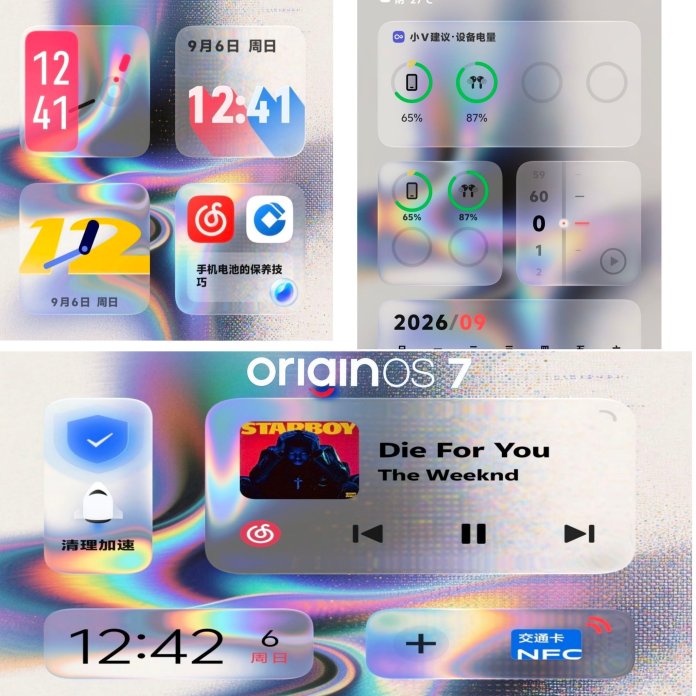
Dynamic Transparency and Lighting Effects
What makes the Liquid Glass aesthetic feel distinct is its response to screen movement and color changes:
Light Harvesting: The curved borders of each widget catch dominant tones from your wallpaper, creating natural highlights.
Refraction Effects: When swiping across pages or launching app folders, light moves across the glass boundaries naturally, mimicking real-world refraction.
Under-the-Hood Motion: Visual smoothness goes hand in hand with performance, building directly on underlying upgrades detailed in our breakdown of OriginOS 7 Features: Blue River Engine, Virtual Graphics Card 4.0, & Liquid Motion Effects – NPowerUser.
Interactive Glass Components & Fluid Wallpapers
The Liquid Glass concept extends past static widgets into dynamic, real-time interface elements:
Fluid Lock Screen Depth: Clock typography and notification cards now weave behind foreground subjects in custom wallpapers, applying localized glass diffusion effects right at the intersection points.
Real-Time Light Tracking: Holding and tilting your device triggers built-in gyroscopic lighting shifts, causing ambient reflections to roll across widget edges in tandem with your natural wrist movements.
Morphing Media Cards: Music players and system toggles expand smoothly into full-screen translucent pop-ups, creating a seamless visual flow without abrupt cuts or hard borders.
Powered by Core System Upgrades
Great aesthetics require strong system optimization to remain lag-free. Vivo ensures these complex visual layers run continuously at high frame rates by pairing the Liquid Glass UI with deeper architecture optimizations.
Underneath the shiny visual polish, the operating system relies heavily on new underlying performance frameworks. You can read more about how system efficiency and memory allocation are managed in our coverage of OriginOS 7’s Blue River Engine performance upgrades.
Customizable Opacity & Personalization
A common flaw with heavy glassmorphic interfaces is poor sunlight legibility or distracting background patterns. OriginOS 7 addresses this directly by granting granular control over widget density:
Opacity Sliders: Users can manually tune the transparency levels of individual cards from subtle frosted mist to ultra-clear crystal reflections.
Adaptive Color Tints: When dynamic accent coloring is enabled, the glass panels subtlely tint themselves to complement primary system themes without washing out contrast.
Smart Context Switching: In low-light environments or night mode, the glass optics automatically tone down harsh specular highlights to reduce eye strain while preserving multi-layer depth.
A Noticeably Elevated Experience
Modern mobile UI design continuously swings between minimalist flat shapes and complex textures. OriginOS 7 hits a comfortable sweet spot. By pairing real-time optical effects with silky system animations, Vivo delivers a tactile and ultra-responsive home screen experience.
The multi-layer depth, dynamic transparency, and colorful reflections combine to give the software an unmistakable high-end feel—making daily interactions feel polished and refined.


