

Trying to navigate a foreign language in real time often comes with awkward friction. Whether you are staring down at an open screen on a moving train or holding your phone speaker out in a loud terminal, translation apps have traditionally demanded your phone’s full attention.
Google is removing those friction points with two practical features for Google Translate: true background operation during live translation and direct earpiece audio playback. For more breaking software rollouts across the ecosystem, you can track our ongoing coverage on NokiaPowerUser’s Goole news section.
Multitask Freely with Background Live Translation
Until now, using Google Translate’s live mode meant keeping the app open on screen. Switching to check a map, respond to a message, or simply locking your display meant interrupting the session.
The new update allows live translation to continue running seamlessly in the background. System notifications handle control outside the main interface, keeping you updated without tying up your phone.
Why it matters: You can lock your device or switch apps while listening to live announcements on a train, keeping hands free and battery drain down.
Where it’s available: Rolling out now on Android, with iOS support coming in a future update. Keep an eye on our Google apps coverage for immediate alerts when the iOS background update drops.
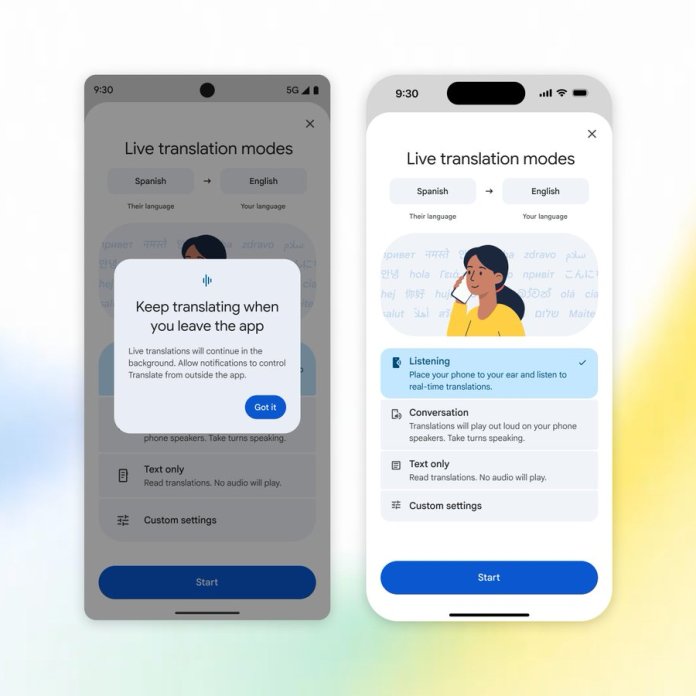
Discreet Listening via Phone Earpiece on iOS
Broadcasting translated text over a phone’s loud main speaker isn’t ideal in a crowded room, and holding your phone out like a walkie-talkie can be uncomfortable. To solve this without requiring Bluetooth earbuds, Google Translate now supports direct routing to your phone’s top earpiece speaker.
By choosing the Listening mode, you can hold the phone up to your ear like a standard phone call and hear live translations clearly and privately.
Why it matters: Perfect for noisy environments like airports or train hubs when you don’t have headphones handy and need to hear spoken translation clearly.
Where it’s available: Now available on iOS (joining existing support on Android).
Understanding the New Live Translation Modes
The updated interface organizes translation methods into clear operational modes depending on your immediate environment:
Listening: Routes real-time translated audio directly through your phone’s earpiece when held to your ear.
Conversation: Uses the main phone speaker for active, back-and-forth dialogue between two people.
Text Only: Mutes spoken audio entirely, outputting live transcriptions on screen.
Custom Settings: Allows quick adjustments to notifications, audio routing, and language controls.
These feature updates are rolling out globally across the latest versions of the Google Translate app on Google Play and the Apple App Store.





