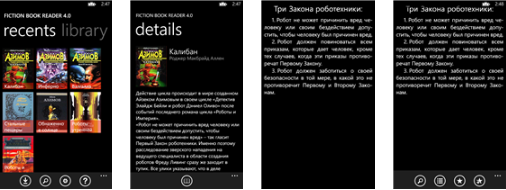
 The Windows phone app which has gone free next as myAppfree app of the day is Fiction Book Reader. This is an app for reading e-books. With a pleasant design and interface , you will be able to read effortlessly your e-books. You can use bookmarks, create notes, share and translate.
Fiction Book Reader Features:
– Support SkyDrive, Dropbox, OPDS catalogs and SD card for book downloads.
– Support fb2, epub (without DRM), mobi (without DRM) and txt formats.
– Automatic word wrapping (optional).
– Customizable appearance: 14 fonts, 21 font sizes, 3 color schemes, 5 brightness modes.
– Portrait and landscape orientation with automatic switch (optional).
– Contents and notes navigation.
– Support links to web and emails.
– Quick text search.
– Text selection with possibility to: copy, bookmark, share (in social networks, or send over email or SMS), and translate.
– View the illustrations for the book in a larger size.
– Wide range of custom settings for maximum usability.
– Translate texts