OPPO’s software team is taking custom Android skins to a whole new level. Early leaks of ColorOS 17 reveal a massive visual upgrade focused on system-wide motion, fluid light dynamics, and interactive physics.
If you thought Android UI animations were getting stale, pay close attention to what ColorOS 17 does when you flip your phone into landscape or unlock your display.
Redesigned Quick Settings in Landscape (Featuring “Contour Glow”)
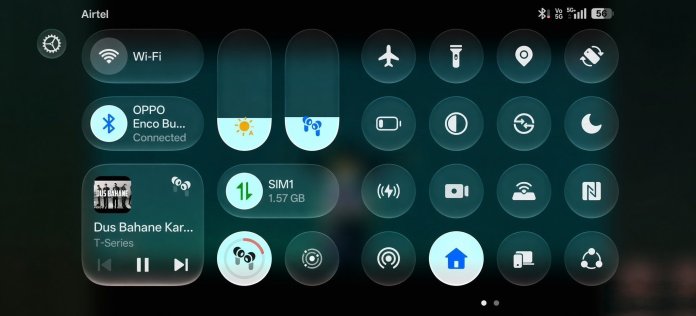
Using Quick Settings in landscape mode has usually been a clunky experience on smartphones. Large tiles hogged the display, while essential volume and brightness sliders got pushed to awkward screen edges.
ColorOS 17 completely fixes this with its new Liquid Acrylic design overhaul:
Adaptive Horizontal Split: Flipping to landscape cleanly splits your controls. Media playback, volume, and brightness sit on one side, while your main quick toggles stay neatly organized on the other. For a full breakdown, check out the ColorOS 17 Quick Settings Contour Glow & Media Player leaks.
The “Contour Glow” Effect: Every interactive tile, circular toggle, and slider softly radiates an ambient light field along its border. This gives the Control Center an elevated 3D look over dark wallpapers without compromising readability.
Real-Time Progressive Blur: The system applies dynamic depth-blurring behind the landscape panel, letting background app content gently bleed through while maintaining stable frame rates.
INSANE: Lockscreen to Homescreen Clock Transition Effect
This is INSANE!
New Lockscreen to Homescreen Transition Animation Effect on ColorOS 17.Pay attention to the Clock….
This has stepped into the next Level when it comes to Animation 🔥 pic.twitter.com/3dPMng6vde— TECH INFO (@TECHINFOSOCIALS) September 9, 2026
The true star of the update is the upgraded Flux Lockscreen Transition.
Pay Attention to the Clock…
On older software builds, unlocking your phone triggers a basic fade or zoom effect. In ColorOS 17, the clock is treated as an active physics object:
Morphing Typography: The moment your face or fingerprint unlocks the device, the lockscreen clock smoothly scales, morphs, and glides right into position as a home screen widget.
Fluid Fusion Physics: Driven by OPPO’s upgraded animation engine, the numbers squish and stretch based on your swipe velocity. A quick swipe snaps the clock into place with a subtle bounce, while a slow drag keeps the numbers tracking your finger in real time.
Contour Glow Continuity: The ambient glow surrounding the lockscreen clock numbers carries through the entire transition, preserving depth until your home screen grid locks in.
Why ColorOS 17’s Animations Step It Up
Micro-animations can often cause micro-stutters, but ColorOS 17 utilizes chip-level frame synchronization to keep motion buttery smooth.
Parallel Processing: Interrupting an animation mid-flight—like dragging down Quick Settings while unlocking—no longer causes dropped frames or sudden visual pops.
Elastic Tactile Feedback: System buttons, floating notification bars, and clock widgets now share unified spring-and-damping profiles, giving every touch an elastic, physical feel.
ColorOS 17 isn’t just tweaking visual assets—it brings one of the most fluid, visually stunning UI flows seen on Android.